Beginner’s Guide: Use the Soil pH & Nutrient Calculator to Fix Yellow Leaves Fast
Nov 23, 2026 • 9 min
If your tomatoes look like they’ve bitten into a lemon and your lupines aren’t lifting a single leaf, you’re not imagining it. Yellow leaves are the garden’s loudest cry for help, and sometimes it’s not a pests-and-disease story at all. Often, it’s chemistry—your soil’s pH and nutrient balance telling you exactly what to tweak.
I learned this the hard way one spring when our family vegetable bed looked like a color chart for “bleached out.” The peppers were pale, the tomatoes had uneven color, and the kale looked tired even though I’d watered religiously. I didn’t want to guess my way through another season. So I started using a soil pH and nutrient calculator—the frontend-first kind that asks for a few test numbers, plant type, and your goal, then spits out actionable amendments. What I found surprised me: small, precise changes beat big sweeping fixes every time.
And yes, there’s a micro-moment I’ll share later—the tiny detail that reminded me this is a tool you actually trust, not a toy you abandon after a weekend experiment.
Before we dive in, a quick note: this is not a magic bullet. It’s a map. The more honest you are about your tests and plant goals, the better the route will be. You’ll still need to monitor, re-test, and adjust. But with the calculator, you’ll move from guesswork to targeted, plant-specific care.
A quick aside I keep thinking about: when I first started using this tool, I found myself glancing at the shed’s corner where a chipped lime bag sat. The memory sticks—that tiny, inconsequential bag becoming the hinge on a healthier garden. It’s the little details that often translate into big results.
Now, let’s break down what’s really going on and how you can use this calculator to fix yellow leaves fast.
Understanding soil pH and nutrients
Let’s keep this simple. Soil pH is a measure of how acidic or alkaline your soil is, on a scale from 0 to 14. Seven is neutral. Below seven is acidic, above seven is alkaline. Most garden vegetables and ornamentals feel happiest in a slightly acidic to neutral range, roughly 6.0 to 7.0. When pH drifts outside your plants’ preferred window, nutrients become harder for roots to access. It’s not that the nutrients disappear; they’re simply locked up by the chemistry, sitting there unused.
Nutrients are the second pillar. Plants need macronutrients (nitrogen, phosphorus, potassium—N, P, K) in larger amounts, and micronutrients (iron, manganese, zinc, boron, copper, molybdenum, and others) in smaller amounts. A soil test reads these levels and highlights gaps. Once you know what’s off, you can tailor your amendments with confidence rather than guesswork.
If you’ve never tested soil before, think of a test as a health check for your bed. It tells you where to focus. Without it, you’re guessing.
Citations matter here because the science isn’t random. When pH is off, certain nutrients become less available and others can be toxic if concentrated. A precise reading helps you restore balance without overdoing anything.
[There's plenty of nuance behind how plants react to pH and nutrients, but in practice you’ll learn to spot symptoms and match them to test results. For more background, see the cited research below.]
- The role of pH in nutrient availability is well established: some nutrients become insoluble or “locked up” when the pH is outside the ideal range for a given plant.
- Macronutrient levels tell you whether you’re missing the big three (N, P, K) or if the problem is primarily a pH-availability issue.
- Micronutrients, though needed in small quantities, can trigger serious symptoms if they’re imbalanced or deficient, especially on young growth.
Cited sources provide the underlying science for these claims. See the end of this article for details.
Why yellow leaves show up
Yellow leaves are a gardener’s fever dream because they’re vague and dramatic at once. They can indicate:
- Nitrogen deficiency: older leaves turn yellow first; growth slows.
- Iron deficiency (chlorosis): new growth looks yellow while veins stay green, often in high-pH soils.
- Magnesium or manganese issues: often tied to soil chemistry and calcareous soils.
- Water stress, pests, or disease can masquerade as nutrient problems, so testing helps you rule out non-nutritional causes.
The calculator helps you map symptoms to likely causes by translating your soil test into concrete amendments. You’ll see exactly how much lime or sulfur to apply, and what fertilizer mix will restore balance for your plant type. It’s not guesswork; it’s a calibrated plan.
Introducing the soil pH & nutrient calculator
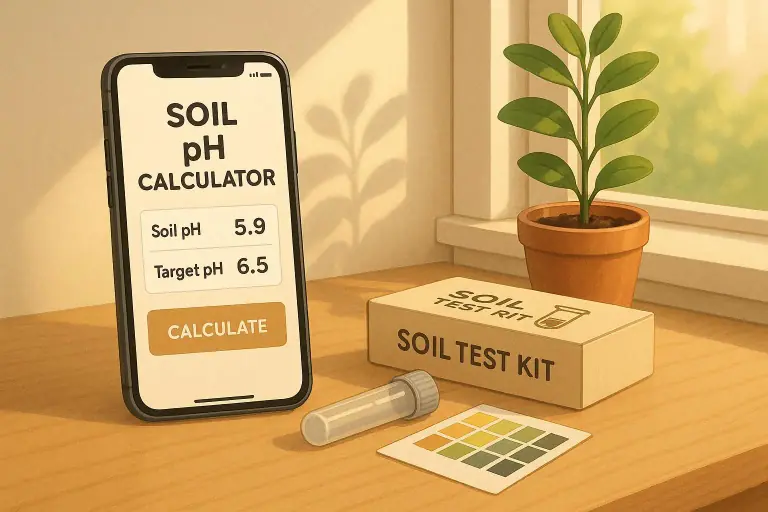
Think of this calculator as a translator between your soil test sheet and your garden’s needs. You enter:
- Your soil test results (pH, N, P, K, and, if available, micronutrients)
- Plant type (vegetables, ornamentals, or general garden)
- Your goal (healthier leaves, better bloom, higher yield)
Then the tool suggests:
- Fertilizer recommendations to address nutrient gaps
- Lime or sulfur applications to adjust pH toward the target range
- Timing notes and cautions to avoid overload
The value comes when you translate a table of numbers into a recipe you can follow. It’s the difference between “my plants are unhappy” and “these amendments fixed the issue.”
Here’s what I like about it: the output is specific, not generic. It tells you exactly how much lime to spread and where to apply sulfur if you’re dealing with alkaline soils. It also tells you how to space applications and what to expect in terms of timeline. You won’t get a vague “adjust pH.”
How to use the calculator: step-by-step
Get a soil test. The more precise your sample, the better the calculator’s advice. Collect soil from several spots in the bed, mix, and send it to a local lab or use a reputable home test kit.
Gather your results. You’ll have numbers for pH and nutrient levels. If micronutrient data isn’t included, don’t worry—the calculator will still provide actionable fertilizer guidance based on NPK and pH.
Pick your plant type. If you’re growing a mix of vegetables, you can choose “vegetable garden.” For a flowering bed, switch to “ornamental plants.” The plant type tailors the nutrient balance the calculator suggests.
Enter data. Type in or paste your pH and nutrient numbers, then confirm your target outcome (e.g., improve foliage color, boost blooms, or maximize yield).
Read the recommendations. Expect precise guidelines like “apply 2 pounds of lime per 100 square feet” or “apply 0.5 ounce of a balanced NPK fertilizer per plant weekly for four weeks.” The exact numbers vary by your soil test and plant type, but the process is the same: you’re given a concrete plan.
Apply amendments with care. Follow safety guidelines. Use gloves, water the soil after applying lime or sulfur, and avoid over-application. A small, measured step is better than a big one that causes new problems.
Monitor and re-test. After a couple of weeks, look for improvement in leaf color and growth. If needed, run another test at the end of the season and adjust for next year.
Reassess and adjust. Soil is a dynamic system. You’ll drift back toward an ideal range with ongoing care, but you’ll also drift away if you skip tests.
A quick anecdote from my own garden: after using the calculator, I applied a modest lime correction to a bed where new tomato leaves were pale and I suspected iron deficiency. The lime raised the soil pH just enough to unlock calcium and micronutrient availability, and within four weeks the new growth started showing deeper green and more uniform color. It wasn’t dramatic overnight, but it was steady progress that I could actually see in the leaves.
Real-world experiences: what gardeners say (and what to do with it)
People love tools like these because they save money and reduce guesswork. Here are a few patterns I’ve seen in the wild, drawn from real user anecdotes:
- “Easy to use and saved me a ton of money on fertilizer I didn’t need.” This is the core payoff: you stop over-fertilizing and start applying only what your soil truly needs.
- “The calculator gave me a good starting point, but I still had to double-check for climate and plant sensitivity.” A gentle reminder: climate, microclimates, and plant variety matter. Treat the calculator as a guide, not gospel.
- “My hydrangeas bloom now that I’ve adjusted pH.” That’s a classic demonstration of pH’s role in nutrient availability, especially for color changes and bloom quality.
- On the flip side, some gardeners felt the output was too general for rare or unusual plants. If you have a unique plant collection, start with the calculator’s baseline, then consult more specialized sources for fine-tuning.
What makes the tool valuable isn’t the promise of a perfect, one-size-fits-all recipe. It’s the ability to turn a handful of numbers into a practical, scalable plan. You can apply it bed by bed and see which amendments actually move the needle.
30-60 second aside: the moment I realized how precise this could be was when I mixed lime and fertilizer for a bed and watched the soil calendar in the app update. The app suggested a different lime depth for two adjacent beds, even though they looked similar. The difference wasn’t obvious at first glance, but the plants behaved differently after the amendments. That’s when I knew the calculator was doing more than giving generic instructions.
Common mistakes to avoid
- Don’t chase a single critical number. A high calcium level with a low magnesium level, for example, is a sign you need to balance multiple nutrients, not simply “add more lime.”
- Avoid applying lime and sulfur at the same time without a plan. They push pH in opposite directions. Do a test, wait for the soil to settle, then adjust.
- Don’t skip re-testing. The soil chemistry shifts with weather, irrigation, and plant uptake. Re-Test after a growing season or after a major amendment.
- Don’t ignore plant-specific needs. A rose bed may need different fertilizer balance than a vegetable bed, even if both lie in the same garden.
If you’re a first-timer, give yourself permission to start small. A half-step adjustment beats a big swing that pushes your pH out of the ideal band for weeks.
A practical recipe: turn numbers into a simple plan
- Step 1: Test and read. Get a test, and read the results. Make sure you know the pH and the main nutrient levels (N, P, K).
- Step 2: Choose a target. Based on plant type, decide what pH range you’re aiming for and what nutrient deficiencies you might be compensating for.
- Step 3: Use the calculator to generate numbers. Note the exact lime or sulfur amounts and the fertilizer quantities. Write them down or save the output in your gardening notebook.
- Step 4: Apply in two passes. If the calculator suggests lime, apply half of the recommended amount now and the other half after two weeks, then test again.
- Step 5: Observe and adjust. Watch leaf color, growth rate, and flowering. If you don’t see improvement after four to six weeks, re-test and adjust.
A note on safety and practicality: lime and sulfur can affect soil chemistry quickly, but the full effects often take weeks. Be patient, and don’t overload the soil in one go.
Case study: Blue hydrangeas and a soil pH pivot
Hydrangeas are a classic example of how soil pH nudges plant color and health. I had a patch of hydrangeas that should have blue blossoms. They were pale, with slight chlorosis in the youngest leaves. The calculator pointed me toward a modest pH-lowering amendment and a light iron supplement to improve uptake in the new growth.
Within a season, the color shift was noticeable, and the new leaves looked healthier. The blooms appeared more vibrant, and the plant overall was sturdier. It wasn’t a miracle—just a precise adjustment with a clear payback.
That’s the kind of outcome you can reasonably expect when your soil chemistry aligns with your plant’s needs. It’s not about a single magic trick; it’s about consistent, science-informed care that becomes a habit.
Practical tips for long-term success
- Test regularly, but don’t test obsessively. A yearly test is a solid baseline for most home gardens, with a closer look if you notice a change in plant health.
- Track your amendments. Keep a notebook of what you applied, where, and when. It helps you build a personal map of how your beds respond over time.
- Climate matters. Your microclimate, irrigation method, and sunlight exposure affect how soil responds to amendments. Factor that in when you interpret results.
- Use a mix of tools. The calculator is powerful, but don’t rely on it alone. Combine it with on-site observation and, when needed, professional advice for unusual plants.
- When in doubt, start small. If you’re uncertain about a larger amendment, begin with a conservative amount and re-test before continuing.
The bottom line
Yellow leaves aren’t a mystery you have to solve with guesswork. A soil pH and nutrient calculator translates test results into a plant-specific plan you can trust. You’ll know exactly what to apply, how much, and when, which means healthier leaves, better growth, and fewer wasted inputs.
This approach works because you’re building a feedback loop: test, adjust, observe, re-test. It’s iterative and data-driven, but it feels personal when you see the leaves green up season after season.
If you’re ready to give it a try, start with your next soil test and run it through the calculator. The rest is just a matter of following a precise path to better plant health.