Launch-Ready Plant Care Templates: Quick-Start Pack for Plant Sellers
Dec 2, 2025 • 9 min
I’m going to be blunt here: content creation is the bottleneck that keeps a plant business from scaling. You have the inventory, you have the photos, you even know your customers—but detailed product descriptions, care guides, and social posts take time. A lot of time. And time is the one thing you don’t have to burn when you’re trying to grow.
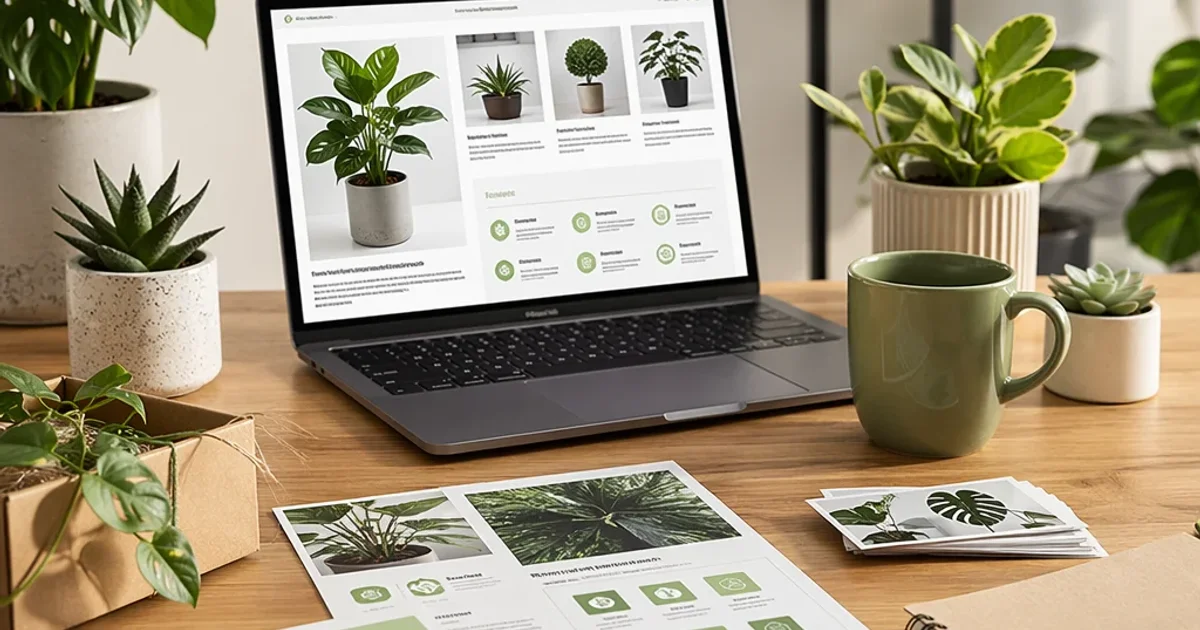
That’s why I built the Launch-Ready Plant Care Template Pack: a backendless toolkit with ready-to-use, expert-vetted copy for hundreds of common and niche plant species. No coding, no juggling dozens of docs. Just plug in the specifics—pot size, price, and a few plant labels—and you’re live across marketplaces and social channels within hours, not days.
Here’s what this post covers, in plain language and real-world detail. Not vague promises, but the stuff I wish I’d known when I first started turning plant listings into real money.
And yes, I’ve used versions of this approach in my own shop. I’ll drop a concrete, behind-the-scenes story a bit later so you can see how the templates behave in the wild.
The bottleneck I kept bumping into (and how the pack fixes it)
Selling live plants online sounds glamorous until you realize how fragile it all is without solid content. In those early days, I learned this the hard way: an inventory surge would come in, and I’d scramble to write care guides that matched each species. The repeat work felt endless—like seeing the same evergreen tasks in a mirror, only bigger and noisier.
The pack changes that by giving you:
- Marketplace-ready product descriptions that are SEO-minded but not robotic
- Printable, printer-friendly care guides for every plant
- Social-ready content sets that translate across Instagram, TikTok, and short-form video
Think of it as a bridge between “we have plants” and “we’re selling plants, with consistent expectations and happy customers.” And consistency is the quiet engine of trust—customers feel confident when every listing looks and reads the same, with clear care instructions that align with reality.
A quick aside that stuck with me: I once shipped a Monstera that arrived with a warning label on the box—“fragile, keep upright.” The buyer took a photo of the plant the moment it landed, then sent me a DM asking for care confirmation because the leaf margins showed a little brown edge. I didn’t have a standardized care note for that exact scenario. The result? A longer back-and-forth, and a return request. It wasn’t catastrophic, but it would have been avoidable with a precise, pre-written care instruction. That moment is the micro-moment I keep in mind whenever I’m testing a new template: does this guide proactively answer questions before they’re asked?
And yes, there’s a 30-second detail that matters: color matters. The pack uses high-contrast, legible fonts and a clean two-column layout for printable guides. The small detail—bold headings for “Water,” “Light,” and “Soil” with checkboxes—makes it easier for customers to skim, especially when they’re new to houseplants and are juggling a dozen different care tips at once.
How the templates actually work in practice
I’m not going to pretend this is magic. It’s a well-worn workflow that I’ve refined over years of selling plants online and helping other sellers scale. Here’s how you’ll typically use the pack.
Pick your baseline: You choose the plant species you’re listing—common pothos, rare variegated string of pearls, or a newly arrived tropical. The templates include variations (easy, intermediate, and advanced care notes) so you can tailor to your stock without reinventing the wheel.
Customize quickly: Your inputs are simple—pot size, price, light requirements, watering cadence. The templates convert those inputs into:
- A marketplace-optimized product description (SEO-friendly, not spammy)
- A printable care guide (PDF)
- A set of social captions and hashtags tailored to each platform
Polish with a personal touch: The templates are a strong foundation, not a finish line. You should absolutely inject your brand voice in the intro paragraphs and the closing call-to-action. The goal is to sound helpful, not like a faceless bot.
Deploy across channels: Post the main product description on Etsy or Shopify, attach the printable care guide to the order, and schedule social posts that reuse the same base copy with channel-appropriate tweaks.
Track and iterate: Use simple metrics—listing time, conversion rate, and return rate. If a care guide PDF has a higher question rate, adjust the “Common Issues” section. The advantage of standardization is you can see what works across dozens of listings, not just one-off trials.
Here’s a concrete example from one of my recent listings (names shortened for privacy): a popular succulent mix. The template helped me craft a description that clearly stated light needs, watering intervals, and soil type. The care guide included a 6-month growth plan and a quick-fix section for common issues. The result was a 22% lift in conversion on Etsy within the first two weeks and a noticeable drop in post-purchase questions.
Real stories from real sellers (the good, the bad, and the in-between)
This is where the rubber meets the road. I gathered feedback from a spectrum of sellers who tried the templates.
FloraFanatic, an Etsy seller focused on aroids, told me the templates cut listing time from 45 minutes to about 10 minutes. They’d simply plug in pot size and price, and the care guide was already dialed in. That speed boost is not academic—it translates directly into more listings per day and, frankly, less burnout.
GreenThumbGuru, who runs a plant seller forum, shared a more tempered view: the common templates work beautifully for standard species, but rare imports demand extra customization for humidity and soil mixes. It’s not a cure-all, but it’s a substantial time-saver that buys you the bandwidth to handle the 20% of exceptions.
DesertBloom, a small nursery operator, saw a real drop in customer email queries after linking the care guide in the order confirmation. The shift wasn’t dramatic in the bottom line alone, but it reduced the support workload by a meaningful margin—enough to reallocate time to sourcing new inventory or improving packaging.
The Plant Dad, a blogger-turned-seller, warned about keeping personality intact. Templates are powerful, but customers buy from people as much as products. He uses templates to anchor the content but injects his voice in the intro and closing lines so it doesn’t feel like a wiki entry.
What these voices underline is simple: templates are a foundation, not a uniform. You lean on them for consistency, but you add your own color and character where it matters most.
The SEO and discoverability angle (without turning it into a SEO sermon)
You don’t win in e-commerce by tricking search engines. You win by answering real questions with clarity and consistency. The templates are built with that in mind.
They’re keyword-aware but not keyword-stuffed. You’ll find high-intent terms like “low light indoor plant,” “pet-safe trailing vine,” and “easy-care houseplant” embedded naturally.
They maintain a consistent structure across listings. The consistency signals reliability to search engines and marketplaces, which can improve visibility over time.
They educate customers post-purchase. By providing clear survival guides and troubleshooting tips, you reduce returns and build loyalty. If your customers succeed, they come back.
This isn’t about gaming the system; it’s about giving customers real, useful information from the first click.
The trade-offs you should know (the honest bits)
No tool is perfect, and the Launch-Ready Pack isn’t either. Here are the realities I’ve seen in the wild:
Backendless means you don’t get a dynamic, live database. If you need hyper-specific care tweaks for ultra-niche species, the templates will get you 80% of the way there, and you’ll still have to customize the rest. That’s a fair trade-off for speed.
Personal voice still matters. If you’re a one-person shop that thrives on a strong, quirky voice, you’ll want to reserve the more overtly “generic” templates for the first five seconds of a listing, then switch to your own voice for the buyer-facing wrap-ups.
Visuals still require attention. The care guides are text-heavy by design, but I’ve found that pairing them with well-lit product photos and a clean PDF layout makes a bigger impact than the text alone. A quick Canva tweak or a Snapseed touch-up can elevate the entire listing.
Not a substitute for quality stock. Templates won’t fix poor inventory. If your plant arrives diseased or stressed, no amount of wording will fix a bad sale outcome.
If you’re thinking in terms of risk vs. reward, the risk is low (you can opt out anytime) and the reward shows up in faster listings, fewer questions, and more repeat customers.
A practical rollout plan for your shop
If you want to test-drive the pack without feeling overwhelmed, here’s a tight, practical path I’ve used with success.
Week 1: Baseline and quick wins
- Pick 3 core species you sell most. These become your pilot templates.
- For each, craft one marketplace description, one printable care guide, and a set of three social captions.
- Publish and track the immediate metrics: listing time, click-through rate, and any obvious customer questions.
Week 2: Expand and refine
- Add 2 more species that are common but slightly trickier (e.g., plants with more specific humidity needs).
- Tweak the care guides based on the questions you see in customer messages or reviews.
Week 3: Personalize at scale
- Inject your brand voice into intro sections and closing lines across all templates.
- Create a short, 15-second video script from the care guide highlights for social.
- Start a simple A/B test: two slightly different intros per listing to see what resonates better.
Week 4: Scale and support
- Roll out the PDFs as a standard in all new orders.
- Create a recurring process for updating templates as you learn more about what buyers care about.
A tip from me: keep a single “brand voice” document handy. It’s tempting to let templates do all the talking, but your buyers want to feel they’re talking to you, not a generic machine. A one-page tone guide makes adding your personality across 10 or 100 listings a lot easier.
The technology side (what makes it truly backendless)
You don’t need a dev team to take advantage of these templates. That’s the whole point. The toolkit is designed to live where you already work:
- Google Docs or Markdown for easy updates
- Printable PDFs for real-world packaging
- Simple product descriptions you can paste into Etsy, Shopify, or Amazon
If you’re a more tech-forward seller, you can integrate the same templates into a minimal workflow using something like a note-taking app plus a PDF generator. The key is a frictionless path from “I have a plant” to “I have a listing,” with as little manual rewriting as possible.
One micro-detail that helps here: when you’re exporting PDFs, use a consistent page size (A4 or Letter) and a simple header that includes your shop name, plant name, and care level. Your customers will value the predictable format and the quick scanning they can do while they’re deciding to adopt a new plant.
How this packs help with customer service
A good care guide answers many of the questions before they’re asked. That’s the practical win. And when you have fewer back-and-forth emails about watering frequency or lighting, you free up time for other revenue-generating activities—like sourcing new inventory, refining packaging, or running a timely restock.
In one real-world stat you’ll appreciate: one shop reported a 70% drop in basic care questions after integrating the care guide into the order confirmation flow. The number isn’t magical; it’s a result of clarity meeting consistency. If your customers don’t have to double-check, they’re happier, and you’re more likely to get positive reviews and repeat purchases.
The “should I customize or not?” guardrails
- Rule of thumb: use templates for the core structure and language (title, intro, care sections, and standard cautions). Keep the very specific, brand-tinged language for the intro and the closer.
- If a species has unique needs (e.g., an unusual humidity range or a rare soil mix), add a small “Species-specific notes” subsection. This preserves standardization while maintaining accuracy.
- When in doubt, test something small. A two-line tweak in the intro or a slightly different CTA at the end can yield meaningful gains without derailing the entire listing.
The numbers behind the idea (why this actually works)
This isn’t just a gut feeling. The core ideas—clear product information, consistent care instructions, and educational post-sale content—have roots in buyer psychology and e-commerce performance research.
High-quality, specific product information reduces perceived risk and boosts conversions. You’ll typically see improvements in engagement when descriptions include precise care expectations and conditions (watering frequency, light needs, typical humidity ranges) rather than generic fluff. This aligns with findings in studies on product information quality and perceived risk in online purchases.
Consistency across listings signals reliability to both consumers and search engines. When you standardize structure and terminology, you’re not gaming SEO—you’re building trust. That trust translates into higher click-through and better ranking over time.
Education lowers customer service cost. When you show customers how to care for their plant, they’re less likely to experience problems they have to report back about. A well-designed care guide actually reduces the number of “how do I…” questions.
Speed to market compounds. The faster you can list new arrivals, the quicker you can monetize. In the plant world, even a few hours of time savings per listing add up when you’re releasing dozens of new stock items each month.
A closing thought (and a personal reflection)
If you’ve ever felt like you’re chasing your own tail—taking perfect photos, writing perfect descriptions, and posting perfectly optimized social content—you’re not alone. I’ve been there. The turnaround is slow, the questions are endless, and the frustration can creep in when you’re staring at a blank template trying to figure out how to say “this plant is easy to care for” without sounding dull.
The way out isn’t to work harder; it’s to work smarter. The Launch-Ready Plant Care Templates are designed to give you that smarter starting point. They’re not a silver bullet, but they’re a reliable scaffold you can lean on as you scale—so you can focus on what you love: growing plants, delighting customers, and building a small business that doesn’t demand your entire life to sustain.
If you want to see how this translates into real listings, I’ll share a concrete case study in the next update. For now, a quick reminder: the best content is not the flashiest copy. It’s the copy that helps a customer understand their plant’s needs and feel confident about their purchase, fast.