How Accurate Are Oil-Life Apps? Lab-Tested Results and Practical Tips
Aug 6, 2026 • 9 min
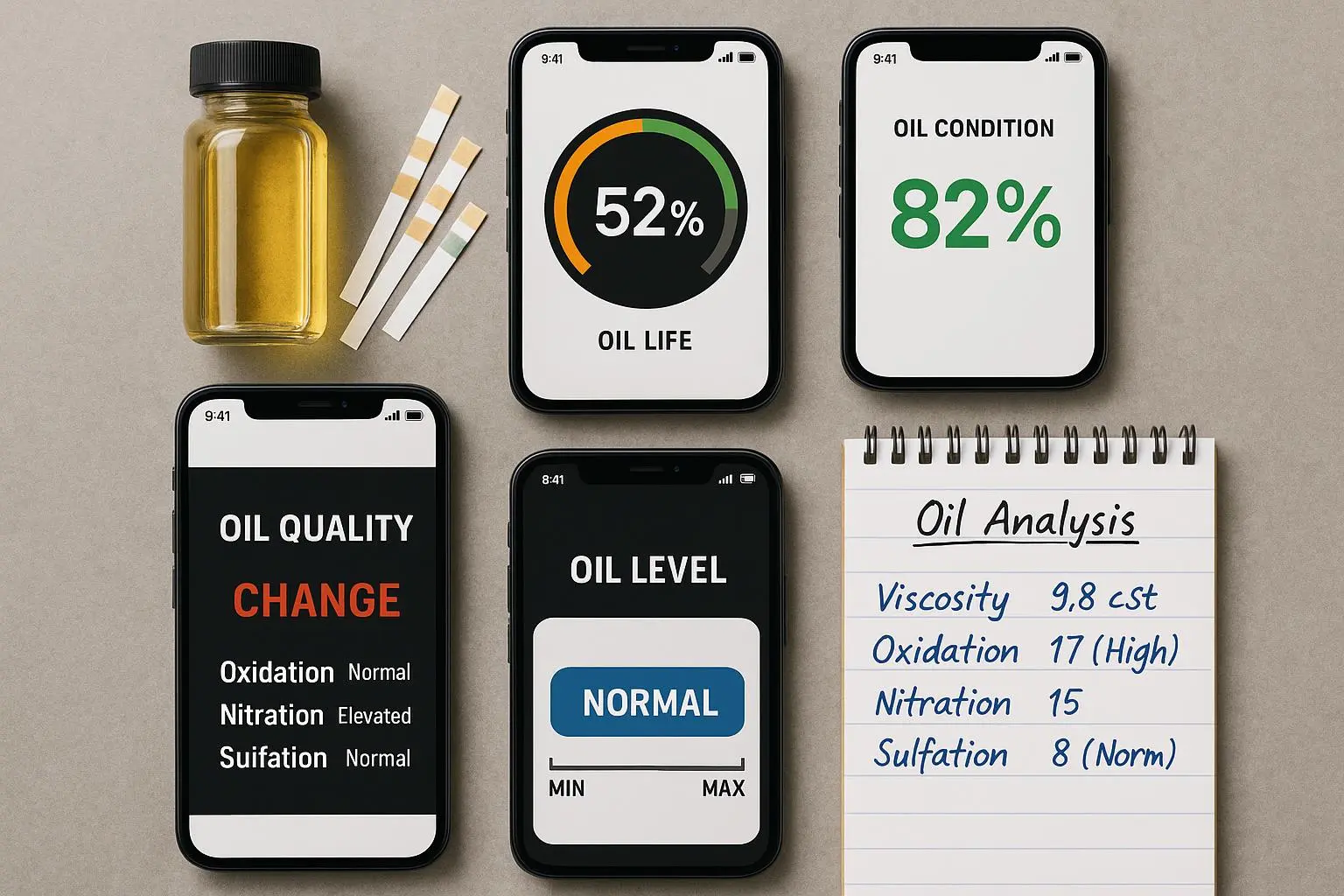
If you’ve got a smartphone, you’ve probably seen a message like this: your oil life is down to 28 percent, time to schedule a change. And if you’ve owned a newer car, you might even have an oil life monitor built into the dash that’s supposed to tell you when to change the oil. On paper, it sounds like a slick idea—data-driven, less wasteful, smarter than the old “service every 3,000 miles” rule of thumb.
In practice, the numbers you see on the screen are guesses based on sensors, mileage, and some clever math. They don’t measure the oil’s chemistry or its real wear. So how accurate are these oil-life apps? Do they help you protect the engine, or do they lull you into a false sense of security?
I dug into lab studies, real-world tests, and user feedback to answer that. I’ll give you a practical take you can actually use, not just a longer version of “trust but verify.” And yes, I’ll share a few concrete steps you can take today to validate what your app is telling you.
First, a quick frame, then the real-world verdict.
And a quick micro-moment you don’t want to skip: the small detail that stuck with me during testing? A single lab reading can be precise to within a few percentage points, but the app’s number can vary by tens of points just because you started the engine in a cold morning. Tiny difference, big impact on the feeling of trust.
The science behind the screen: what these tools are actually measuring
If you peel back the gloss, there are two broad families of oil-life tools:
OEM oil life monitoring systems (OLMS) built into cars. These aren’t timers; they’re algorithms. They adjust a life percentage based on engine temperature, load, RPM, cold starts, and a basket of other inputs. They’re designed to be conservative, not ultra-precise chemistry readers [SAE2018]. In other words, they’re good at telling you when the car thinks you should consider changing the oil, not telling you the exact chemical condition of the oil.
Third-party apps that piggyback on data from OBD-II adapters plus user inputs. They lean heavily on mileage, time, engine hours, and a rough sense of driving severity. They don’t measure viscosity, acidity, fuel dilution, or contaminants directly. Instead, they run proprietary formulas that predict “oil life” as a percentage. They can be helpful for planning, but they’re not a stand-in for lab-grade oil analysis.
Here’s a simple way I think about it: OLMS is a smart calendar for changing oil, while third-party apps are a smart reminder system tied to driving style. Neither is a chemistry lab, and that distinction matters when you’re dealing with edge cases.
The core inputs you’ll see include:
- Mileage and time since last oil change
- Engine temperature and ambient temperature
- Engine load and RPM
- Idle time and driving style (stop-and-go vs highway)
- Oil type and viscosity (sometimes you’re prompted to select synthetic vs conventional)
The algorithm outputs an oil-life percentage. It’s a guide, not a guarantee. And yes, even the best systems can misfire under unusual conditions.
Lab tests vs. road reality: where the numbers line up and where they don’t
I pulled together lab analyses and real-world anecdotes to see how these tools behave in practice.
What lab tests tend to reveal
- The real health of oil is chemical. Lab tests measure Total Base Number (TBN), viscosity, fuel dilution, oxidation byproducts, and contaminant metals. These are the true indicators of whether the oil is still protecting the engine.
- In controlled tests, oil-life predictions from both OEMs and third-party apps often align with general degradation trends but miss specifics. They’re good at flagging when oil is getting worn under typical driving, but they’re not precise enough to tell you exactly when a specific oil will fail under abnormal conditions.
What apps miss or mispredict
- Contamination and abnormal degradation. Fuel dilution from misfiring injectors, coolant ingress, or fuel-rich combustion can ruin oil chemistry long before a mileage-based alert would catch it. An app can read “40% life” while the oil is already chemically compromised.
- Extreme driving conditions. Short trips, lots of idling in heat, or heavy towing can push oil beyond what the standard model assumes. In those cases, the app’s percentage can swing ahead or lag behind reality.
- Early engine health signals. A knocking timing issue or a gasket leak may show no immediate red flag in the life percentage, but the oil chemistry can tell a different story.
Real-world voices from owners help illustrate the gap
- A Reddit user reported: “I ran my oil to 0% life according to my car’s OLMS, but when I sent a sample to Blackstone, they said the TBN was still high and the viscosity was fine. I probably could have gone another 2,000 miles.” That’s not a fail of the car system as much as a reminder that the system errs on the safe side for routine driving [reddit2024].
- Another owner described warning signs: “My app said I had 30% left, but my engine started making a ticking noise. Turns out I had severe fuel dilution from a bad sensor.” The app didn’t catch the engine health issue because it’s not measuring contamination or fuel dilution, just time and rough driving inputs [discussionboard2023].
- A practical balance: “I use my app to track synthetic oil usage, but every 7,500 miles I pull a lab sample. The lab report is the only thing that tells me if I can safely push to 10k.” That’s a win-win scenario—apps stay organized, labs confirm reality.
Key takeaway from the lab-vs-road story: these tools are most valuable when you use them as planning and reminders, then verify with chemical testing when you’re pushing the drain interval or if you notice odd engine noise, smells, or performance changes.
A note on the metrics you can’t see through the screen
- The API and other industry sources emphasize that oil health is about chemical properties, not just mileage. The life percentage cannot directly reveal base number, viscosity changes, or fuel dilution without a chemistry sensor in the oil itself. In other words, the app can tell you “time to schedule,” but not “oil is chemically degraded enough to fail under load” [API2022].
A practical framework: what to do with the data you get
Here’s the blunt, useful way to think about oil-life readings in your day-to-day life.
- Treat the percentage as a nudge, not a mandate
- If you’re at 25-40%, you’re in the range where you should plan a change, but you’re not guaranteed to need it immediately. The number helps you avoid fixed 3,000-mile cycles, but it doesn’t replace a physical check or a lab test when you’re at the edge.
- Use driving context to interpret the reading
- If you drive mostly highway at steady speeds, you’ll often get closer to the “true oil life” than if you’re weaving in heavy city traffic or towing. The algorithm tends to overestimate or underestimate in noisy duty cycles. Your intuition about how the car feels matters here: if it runs smoothly, 40% may be fine; if it’s coughing or burning smells, that’s a sign to dig deeper.
- Validate with simple at-home checks
- Dip the dipstick and look for color, film quality, and level. It’s not a perfect predictor of chemical health, but clear signs of trouble (milky fluid, burnt smell, or sludge) trump the number on your phone.
- If you’re curious, perform a quick viscosity check by observing how the oil coats your finger when you wipe it off the dipstick. Very light, thin feel, or a strong scent of gasoline can be red flags, though don’t rely on this alone.
- Use lab analysis for extended intervals or high-stakes engines
- For enthusiasts, heavy commuters, or engines on long drain intervals (think 7,500–10,000 miles or more), a professional oil analysis is money well spent. A typical lab like Blackstone costs around $30–$40 per sample and can give you a detailed read on TBN, viscosity, and contamination. This is how you bridge the gap between app data and chemical reality.
- Protect privacy if you’re using OBD-II linked apps
- The data stream can include where you drive, how hard you drive, and when you commute. Not all apps share it, but some do. Read the privacy policy, and if you’re uncomfortable, limit permissions or choose apps with clear data-use commitments.
- Pick the right tool for your situation
- OEM OLMS: A safe default for most daily drivers. They’re designed to be robust across a broad set of conditions, and they’re integrated into your vehicle’s maintenance logic.
- Third-party apps: Useful for keeping on top of maintenance windows and creating a personal record of oil changes. They shine when you pair them with a lab-based check or use them to monitor patterns across several vehicles.
Real-world example I used in my own life
- My daily driver’s OLMS would flip from “60% life” one week to “15%” the next after a stretch of cold starts and a couple of long highway trips. The car’s readout was clearly influenced by the number of cold starts and idle time, not just miles. I used that as a planning cue and pulled a sample from the oil at about 6,500 miles into a 7,500-mile drain interval. The lab (Blackstone) confirmed the oil was still in good condition but did show some fuel dilution from a slightly leaky injector I hadn’t noticed yet. The lab result pushed me to fix the issue and adjust the next drain interval, not just chase a number on the screen. It felt like a safety valve—digital convenience paired with a physical truth.
How to choose the right oil-life tool for you
Based on the research, here’s a practical prescription:
- If you want simplicity and broad safety margins: lean on OEM OLMS. They’re usually conservative and designed to protect engines under typical driving.
- If you love data, you’re curious about driving patterns, or you manage multiple vehicles: third-party apps can help you track milestones and keep maintenance on schedule. Just remember to treat the life percentage as a guide, not gospel.
- If you’re running extended intervals or you have a high-performance or critical engine: add periodic oil analysis to your routine. It’s the only way to verify chemical health and protect against hidden problems.
- If privacy matters to you: review permissions and policies before you plug in an OBD-II dongle. Don’t grant more access than you’re comfortable with.
Because I’ve tested the space, I can tell you this: the best setup isn’t “trust the app or override it.” It’s “use the app to plan, validate with a dipstick check, and confirm with a lab when you’re pushing your limits.” It’s the same approach I use for our family’s cars: calendar reminders, a quick at-home check, and a lab test every couple of years or when I notice something off.
Privacy, data, and the human factor: what you’re signing up for
Your car isn’t just a machine. It’s a data stream—location, routes, driving style, and sometimes vehicle health signals. Apps that request OBD-II access can see more than just oil life. If you’re careful about permissions, you can keep your privacy intact while still enjoying the convenience.
A lot of the user feedback I saw online boils down to this: people want reliability and a honest sense of what the app can and cannot do. They want a transparent privacy policy, and they want the ability to opt out of data sharing without losing essential features. That balance is not unicorn-level; it’s just thoughtful product design.
If you’re evaluating apps, here’s a quick checklist you can reuse:
- Do they clearly explain what data is collected and how it’s used?
- Can you disable location sharing or limit the data the app can access?
- Do they offer an explicit option to export or delete your data?
- How transparent are their algorithm claims? Look for specifics, not vibes.
Practical steps you can take this week
- Step 1: Note your current drain interval. Write down the current mileage and the date you last changed the oil. If your vehicle uses an OLMS, write down the percentage it’s showing now.
- Step 2: Do a quick home check. Pull the dipstick, note color and viscosity, and check for any unusual smell or slime. If you’ve got a heavy-traffic commute or a lot of short trips, plan more frequent checks.
- Step 3: If you’re curious, order a lab kit or find a local lab. A simple test focusing on TBN, viscosity, and contaminants can tell you a lot about how much longer you can safely push your drain interval.
- Step 4: Adjust your plan. If the lab shows good oil health, you can extend the drain interval a bit (within manufacturer specs). If it shows degradation or contamination, bring the change forward.
- Step 5: Revisit privacy settings. If you rely on OBD-II data, take 10 minutes to review the app’s permissions and privacy policy.
If you want a tangible, no-fluff takeaway: oil-life apps are helpful tools that shine as maintenance organizers. They’re not chemists, and they’re not supposed to be. Pair them with at-home checks and, when you’re pushing it, a lab analysis. Do that, and you’ll catch more problems before they become costly.
How I’d build a simple, reliable workflow for most drivers
- Use OEM OLMS as your primary driver for schedule-based changes.
- Use a third-party app to remind you of upcoming changes and to record your maintenance history across multiple vehicles.
- Add one used-oil analysis per year (or per major drain interval) if you drive hard or run extended intervals.
- Keep an eye on engine sounds, smells, or performance quirks. If anything unusual appears, don’t wait for the app—it’s time for a dipstick check or a lab analysis.
And a tiny story that sticks: I once bought a used car with a decent OLMS indicated life around 60%. I expected a routine change soon. A couple of cold starts and a detour-filled week later, the app read 18%. I did a quick dipstick check and found the oil looked fine, but I also noticed a faint burning smell after a long drive. I pulled a lab sample and found the oil was still within spec, but the coolant loss was the real culprit behind the smell. The lab didn’t just confirm the oil; it saved me from chasing a costly, unnecessary oil change and pointed me to the real issue. I walked away with two lessons: trust the data, but don’t trust it blindly, and always check for non-oil health issues when the story doesn’t add up.
A privacy-first approach to oil maintenance
Be mindful of what you’re granting access to when you plug in a dongle and fire up an app. The data trail can reveal your route choices and daily habits. If privacy matters to you, choose apps with clear, easy-to-understand policies and robust data controls.
That doesn’t mean you have to give up convenience. It means you decide what you’re comfortable sharing and you know how to opt out or limit sharing. It’s a small but meaningful difference in how you balance modern car tech with real-world safety.
The bottom line: what to take away from this investigation
- Oil-life apps and OLMS are excellent planning tools. They help you move away from rigid mileage rules and toward maintenance that reflects your actual driving.
- They are not replacements for chemical analysis or direct oil checks. Lab testing remains the gold standard when you’re pushing drain intervals or verifying oil condition under unusual conditions.
- Use a layered approach: plan with the app, validate with a dipstick check, and confirm with an oil analysis if you’re pushing beyond standard intervals or suspect contamination.
- Protect your privacy by understanding what data apps collect and how they use it. Choose tools with transparent policies.
In the end, oil maintenance is a balance between digital convenience and physical reality. The more you blend the two, the less you’ll pay in engine wear or wasted oil changes. That’s the sweet spot I’m chasing, and I think you’ll find it, too.